
Smart speakers have changed the way many people interact with technology at home. Instead of reaching for a phone or computer, you can simply ask a voice assistant to play music, check the weather, set a timer, or control compatible smart-home devices.
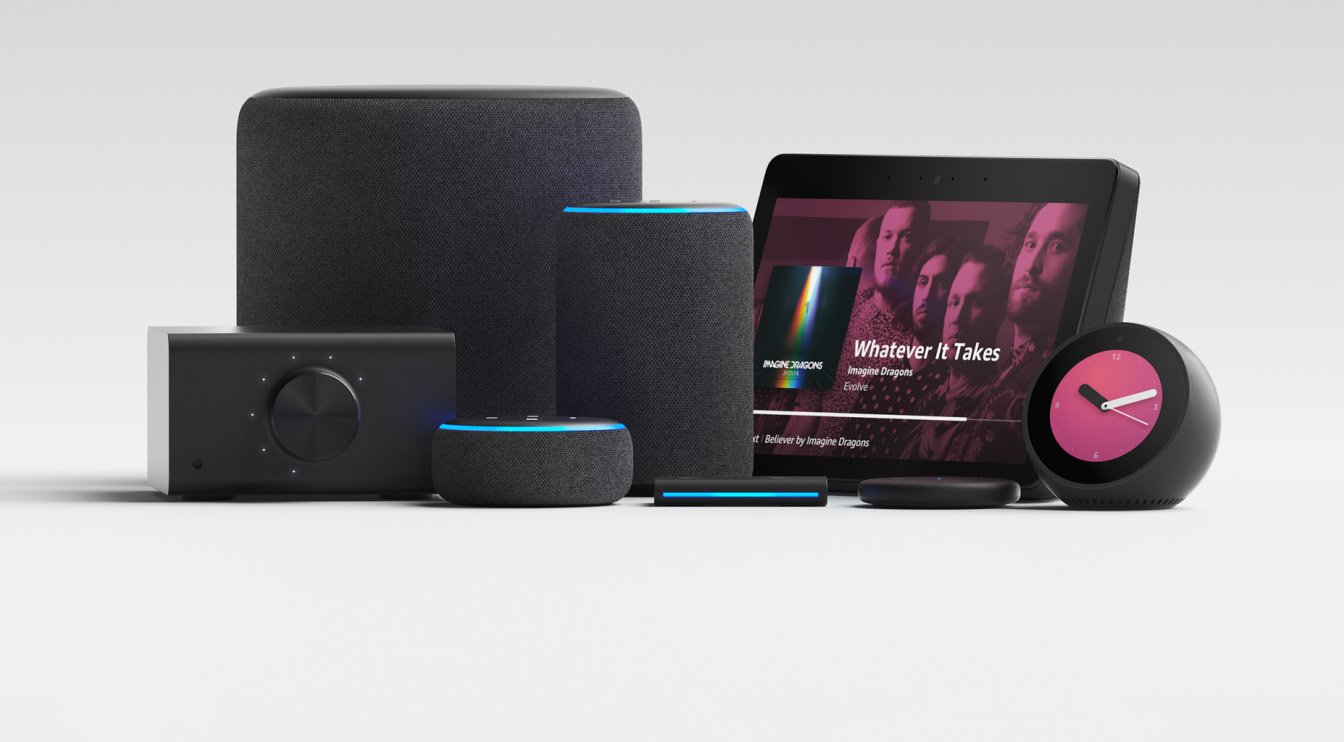
Among the most recognized products in this category are Amazon Alexa devices. The Alexa ecosystem includes smart speakers, displays, and other compatible products that can make everyday routines more convenient.
However, choosing the right device isn’t always straightforward. Different models have different designs, sound capabilities, displays, connectivity options, and ideal use cases. Some are better suited to small rooms, while others are designed for entertainment or visual tasks.
This guide explains how Alexa devices work, what types are available, which features matter, and how to choose one based on your needs.
What Are Amazon Alexa Devices?
Amazon Alexa devices are hardware products designed to work with Amazon’s Alexa voice assistant. The best-known products are Echo speakers and Echo Show smart displays.
Once connected to Wi-Fi and configured through the Alexa app, these devices can respond to voice commands and perform a range of tasks.
For example, you can ask Alexa to:
- Play a particular song or playlist
- Set alarms and reminders
- Create timers
- Answer general questions
- Provide weather information
- Control compatible smart lights
- Manage certain smart-home accessories
- Make calls or communicate with compatible devices
- Add items to shopping or to-do lists
The exact features available can depend on the device, region, connected services, and compatible smart-home products.
How Alexa Devices Work
Alexa devices generally combine microphones, speakers, wireless connectivity, and software that connects the hardware to Amazon’s Alexa service.
When you use a wake word such as “Alexa,” the device listens for a command and processes the request through the Alexa ecosystem.
A typical setup involves:
- Connect the device: Plug the Alexa device into power.
- Install the Alexa app: Use the app to configure the device.
- Connect to Wi-Fi: Select your wireless network and complete setup.
- Customize settings: Choose preferences, services, and compatible smart-home products.
- Start using voice commands: Ask Alexa questions or give commands.
This setup makes the device useful without requiring you to interact with a screen for every task.
Popular Types of Amazon Alexa Devices
Amazon’s Alexa-compatible hardware has appeared in several forms, but the main categories are smart speakers and smart displays.
Echo Smart Speakers
Echo speakers are designed primarily for voice interaction and audio playback. They can be useful for music, podcasts, timers, alarms, questions, and smart-home commands.
Their compact designs can make them suitable for:
- Bedrooms
- Offices
- Kitchens
- Living rooms
- Small apartments
The right Echo model depends on the room size and how important audio quality is to you.
Echo Show Smart Displays
Echo Show devices combine Alexa functionality with a screen. This adds visual information to many voice-based tasks.
Depending on the model, a smart display can be useful for:
- Watching compatible video content
- Viewing recipes
- Checking calendars
- Making video calls
- Displaying photos
- Viewing certain smart-home information
A display can be particularly useful in kitchens or shared family spaces where visual information is helpful.
Alexa-Compatible Accessories
The Alexa ecosystem also works with many third-party smart-home products. Depending on compatibility, users may connect smart lights, plugs, thermostats, cameras, and other devices.
This means you don’t necessarily need every smart-home product to come from Amazon.
Key Features to Consider
Before buying one of the many Amazon Alexa devices, think about how you’ll actually use it.
Sound Quality
If music is a priority, pay attention to the speaker hardware and overall audio performance. A larger speaker may be a better choice for a main living area, while a smaller model can be enough for background audio or voice commands.
Display
A screen isn’t necessary for everyone. If you mainly want timers, music, questions, and smart-home control, a speaker may be sufficient.
If you want recipes, video calls, visual information, or photo displays, consider a model with a screen.
Microphones
Alexa relies on microphones to hear voice commands. Placement matters, too. A device positioned near loud appliances or speakers may have more difficulty hearing commands clearly.
Connectivity
Most Alexa devices rely heavily on Wi-Fi. Before setting one up, make sure the intended location has a reliable wireless connection.
Size and Placement
A compact device can work well on a bedside table or desk, while a larger speaker or display may make more sense in an entertainment or family area.
Where to Use an Alexa Device
One of the advantages of Alexa products is their flexibility.
Bedroom
An Alexa device can be useful for alarms, sleep routines, timers, music, and quick questions without requiring you to pick up your phone.
Kitchen
The kitchen is another practical location. You can use voice commands while cooking, set multiple timers, listen to music, or check recipe information on compatible smart displays.
If you keep several connected gadgets around the kitchen, it is also worth organizing your cables and accessories carefully. A suitable charger and charging accessories guide can help you understand different charging setups and avoid unnecessary cable clutter.
Home Office
Alexa can provide reminders, timers, music, and hands-free assistance while you work. It can also integrate with compatible smart-home products that help automate your workspace.
Living Room
A living room can benefit from an Alexa device for music, smart lighting, routines, and compatible entertainment features.
Alexa Devices and Smart Home Control
Smart-home integration is one of the strongest reasons people choose an Alexa device.
Instead of opening separate applications, compatible products can often be controlled through voice commands.
For example, you might say:
- “Alexa, turn on the living room lights.”
- “Alexa, set a 15-minute timer.”
- “Alexa, turn off the bedroom lamp.”
The experience becomes more useful when several compatible devices are grouped into routines.
For example, a bedtime routine could potentially turn off selected lights, adjust compatible smart-home settings, and perform other supported actions with one command.
Compatibility should always be checked before purchasing a third-party smart-home product because not every device works with every Alexa feature.
Power and Charging Considerations
Most traditional Echo speakers and many Echo Show models are designed to remain connected to a power source rather than operate like a smartphone.
That distinction is important when deciding where to place an Alexa device.
Think about:
- Distance from the wall outlet
- Cable length
- Cable management
- Whether the outlet is easily accessible
- Whether the device will stay in one location
Some Alexa-related products have different power requirements, so always use the appropriate power adapter and follow the manufacturer’s instructions.
For a cleaner setup, keep power cables away from areas where they could be pulled, pinched, or exposed to moisture.
Privacy and Security
Voice assistants are convenient, but privacy should still be part of your buying decision.
Alexa devices include features and settings designed to give users control over aspects of their voice-assistant experience. Before using one, review the privacy settings available in the Alexa app.
Good habits include:
- Review voice-history settings.
- Check connected smart-home permissions.
- Keep the Alexa app updated.
- Use a secure Wi-Fi network.
- Review which services and accounts are connected.
- Use microphone controls when appropriate.
It’s also worth remembering that a smart speaker is an internet-connected device, so basic home-network security matters.
How to Choose the Right Amazon Alexa Device
The best device isn’t necessarily the most expensive one. Start with your actual requirements.
| Your Main Need | Suitable Device Type |
| Basic voice commands | Compact smart speaker |
| Music in a larger room | More capable Echo speaker |
| Recipes and visual information | Echo Show-style display |
| Video calling | Smart display with camera |
| Smart-home control | Alexa-compatible speaker or display |
| Bedroom alarms and routines | Compact Echo device |
| Home-office assistance | Compact speaker or display |
Before buying, consider the room, intended tasks, available space, Wi-Fi quality, and whether you need a screen.
Key Takeaways
- Amazon Alexa devices combine hardware with the Alexa voice assistant.
- Echo speakers are primarily focused on voice commands and audio.
- Echo Show devices add a visual display for supported features.
- Alexa can work with many compatible third-party smart-home products.
- A stable Wi-Fi connection is important for reliable use.
- Choose a device based on your actual needs rather than simply selecting the newest or largest model.
- Pay attention to privacy, power requirements, placement, and compatibility before setting up your device.
FAQs
1. What are Amazon Alexa devices used for?
They can be used for voice commands, music, alarms, timers, questions, reminders, communication, and controlling compatible smart-home products.
2. Do Alexa devices need Wi-Fi?
Most Alexa devices depend on an internet connection and Wi-Fi for their main smart-assistant functions. Some basic functions may work differently depending on the specific product.
3. Is an Echo the same as Alexa?
Not exactly. Echo is a family of Amazon hardware products, while Alexa is Amazon’s voice assistant that powers many of those devices.
4. Can Alexa control smart lights?
Yes. Compatible smart lights can often be connected to Alexa and controlled with voice commands. Compatibility should be checked before purchasing a specific product.
5. Do all Alexa devices have screens?
No. Many Echo devices are smart speakers without displays. Echo Show products add screens for supported visual features.
6. Can I use an Alexa device in the kitchen?
Yes. The kitchen can be a practical location for timers, music, reminders, recipes, and smart-home commands. Keep the device and its power connection away from water and excessive heat.
7. How do I choose the best Alexa device?
Consider whether you need a screen, how important sound quality is, where you’ll place the device, what smart-home products you own, and how much you want to spend.
Conclusion
Amazon Alexa devices can make everyday tasks more convenient by combining voice control with smart-home features, entertainment, reminders, and information services. The key is choosing a device that fits the way you actually live and work.
A compact Echo speaker may be enough for simple voice commands and music, while a smart display can be more useful for recipes, video calls, photos, and visual information.
Before making a purchase, consider sound quality, display requirements, Wi-Fi connectivity, placement, power needs, compatible smart-home products, and privacy settings. With those factors in mind, it’s much easier to choose an Alexa device that provides useful features without paying for capabilities you don’t need.
