
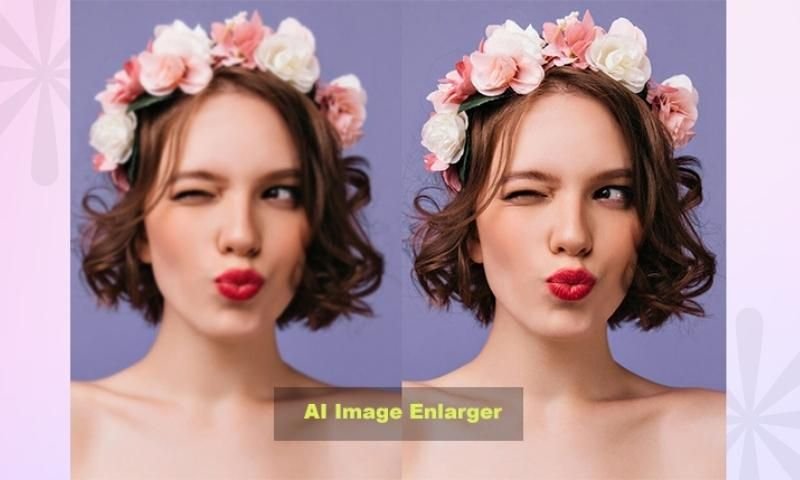
Have you ever found the perfect image, only to realize it’s way too small for what you need? I have. You try stretching it in an editor, and suddenly the face looks blurry, the text gets messy, and everything has that strange pixelated look.
That’s where imglarger can be useful. Instead of simply increasing an image’s width and height, image enlargement tools are designed to improve the picture while scaling it up. For bloggers, designers, online sellers, photographers, and even everyday users, that can save a surprising amount of time.
But is enlarging an image really as simple as uploading a file and clicking a button? Well… mostly. There are a few things worth knowing before expecting a tiny, blurry image to turn into a perfect high-resolution photo.
What Is ImgLarger?
ImgLarger is an image enhancement and enlargement tool that helps users increase image size while attempting to preserve or improve visual quality.
Traditional resizing usually works by stretching existing pixels. That’s why a small image often becomes blurry when enlarged. Modern image upscaling tools take a different approach by analyzing the image and generating additional detail to make the enlarged version look cleaner.
The idea sounds technical, but the actual use is pretty straightforward. You upload an image, select the available enhancement or enlargement option, and let the tool process it.
For someone working with website content, this can be especially handy. Sometimes you receive a product image from a client, and it’s just a little too small for the blog layout. Instead of redesigning the whole page, an image enlargement tool may help make it more usable.
Why Do People Need to Enlarge Images?
Images are used everywhere now. Websites, social media posts, product pages, presentations, advertisements… the list never really ends.
Improving Old or Small Photos
One common reason is simple: the original image isn’t large enough.
Maybe you’ve found an old family photograph that you want to print. Or perhaps a client has sent over a logo that looks fine in an email but terrible when placed on a larger website banner.
Enlarging the image can help create a version that’s better suited for the intended use.
Preparing Images for Websites
Website owners often need images in specific dimensions. A small image might look awkward inside a large featured-image area.
With imglarger, users can explore ways to increase image dimensions before using the file in a website design or blog post. Of course, the final result still depends heavily on the quality of the original image.
A clear, reasonably detailed photo usually has much more potential than an image that’s already heavily compressed.
Creating Content for Social Media
Social platforms constantly encourage visual content. And sometimes an image that worked perfectly for one platform doesn’t fit another.
For example, you might have a small square product image but need a larger version for a promotional design. Resizing and enhancing the image can make the editing process easier.
It won’t magically fix every problem, though. That’s something people should keep in mind.
How Image Enlargement Technology Works
The process behind image upscaling is more interesting than it first appears.
A normal resize operation increases the number of pixels by spreading out the information already available. This can lead to softness and visible pixel blocks.
Image enhancement technology attempts to analyze patterns, edges, textures, and other visual elements to produce a cleaner enlarged result.
Upscaling Is Different From Simple Resizing
This is probably the biggest difference.
If you take a 500-pixel-wide image and stretch it to 2,000 pixels, you’re asking the software to fill a lot of empty space.
Basic resizing methods don’t really understand what’s inside the image. They just interpolate the existing pixels.
An image upscaler, on the other hand, tries to interpret the visual content. That’s why these tools can sometimes produce sharper edges and more natural-looking details.
Sometimes the improvement is impressive. Other times, especially with extremely blurry images, the result can look slightly artificial.
And honestly, that’s normal. No tool can perfectly recover information that was never present in the original file.
Who Can Benefit From ImgLarger?
You don’t need to be a professional photographer to find image enhancement useful.
Bloggers and Content Creators
Bloggers often work with images from different sources, and those images don’t always arrive in the right size.
A larger, cleaner image can work better for:
- Featured images
- Blog graphics
- Social media promotions
- Website banners
- Infographics
For content creators, having a quick option for image enhancement can be much easier than opening complex editing software for every small task.
E-Commerce Store Owners
Product presentation matters. A low-quality product image can make even a good item look less appealing.
Online store owners may use image upscaling when they need larger visuals for product pages, promotional materials, or advertising campaigns.
Still, it’s best to start with the highest-quality product photo available. Enhancement should support the original image, not replace good photography altogether.
Designers and Marketers
Designers sometimes receive less-than-perfect assets. It happens all the time.
A client sends a small logo. An old campaign image needs to be reused. Someone has lost the original file and only has a compressed version.
In situations like these, an image enlarger can be a useful backup option.
Things to Keep in Mind Before Enlarging an Image
It’s easy to assume that bigger automatically means better. Unfortunately, that’s not always true.
Start With the Best Original File
The better the source image, the better your chances of getting a strong result.
A sharp image with decent lighting and visible details can usually be enlarged more successfully than a dark, heavily blurred screenshot.
If you have access to the original photo, use that first.
Don’t Enlarge More Than Necessary
Going from a small image to something slightly larger may produce a natural result. Trying to turn a tiny thumbnail into a massive print-ready poster is a completely different story.
Sometimes less is more.
If your website only needs a moderate size increase, there’s no reason to push the image far beyond what you actually need.
Check the Final Image Carefully
Always zoom in before publishing or printing.
Look closely at:
- Faces and skin details
- Text inside the image
- Straight lines
- Product edges
- Background textures
- Small objects
Sometimes an enlarged image looks great at first glance but shows unusual details when viewed closely.
ImgLarger for Everyday Image Tasks
What I like about tools in this category is that they make image editing feel less intimidating.
Not everyone wants to learn professional design software just to make one photo a little bigger. Sometimes you simply need a usable image and don’t want to spend an hour adjusting settings.
That said, imglarger is best viewed as a practical tool rather than a magic fix.
If you start with a decent image and have realistic expectations, image enlargement can be genuinely helpful. It can give older photos a cleaner appearance, make small visuals more flexible, and save time when preparing content for websites or social media.
Is Image Enlargement Safe for Professional Work?
It depends on the project.
For casual blog images, social posts, presentations, and many digital marketing tasks, an enhanced image may work perfectly well.
For high-end commercial printing, detailed photography, or projects where every visual detail matters, you’ll want to inspect the result much more carefully.
Professional photographers and designers usually prefer working with original high-resolution files whenever possible. That’s still the gold standard.
But when the original isn’t available, image enhancement tools can provide a useful alternative.
Tips for Getting Better Results
If you’re planning to enlarge images regularly, a few habits can make a noticeable difference.
Use Clear Images
Avoid starting with screenshots that are already blurry or heavily compressed.
Choose the Right Image Format
The file format can affect image quality and compression. Keep the original file whenever possible instead of repeatedly saving and compressing the same image.
Avoid Reprocessing Again and Again
Repeated editing can gradually reduce quality. It’s usually better to work from the original image each time rather than enlarging an already enlarged version.
Compare Before Publishing
Keep both versions open and compare them.
Sometimes the enhanced image will look noticeably better. Other times, the original may actually appear more natural. Trust your eyes here.
Final Thoughts
Image quality problems can be frustrating, especially when you’re working on a deadline and the only available photo is too small. I’ve seen this happen with blog graphics, client projects, and product images more times than I can count.
Tools such as ImgLarger offer a practical way to deal with that problem. They can help enlarge and enhance images without requiring advanced editing skills, making them useful for creators, marketers, website owners, and everyday users.
The key is to stay realistic. A good source image can often become bigger and cleaner, but no tool can perfectly recreate every missing detail from an extremely poor-quality file.
Use image enlargement when it makes sense, check the final result carefully, and keep the original file safe. That’s usually the smartest approach.
FAQs
What is ImgLarger used for?
ImgLarger is used to enlarge and enhance images, helping users create bigger versions that may look clearer and more detailed than those produced through basic resizing.
Can I enlarge a small image without losing quality?
Sometimes, yes. The result depends on the original image quality, the amount of enlargement, and the type of image. Clear images generally produce better results.
Is image upscaling the same as resizing?
Not exactly. Basic resizing changes image dimensions, while image upscaling tools attempt to improve or generate visual detail during the enlargement process.
Can bloggers use image enlargement tools?
Yes. Bloggers can use them for featured images, website graphics, social media visuals, and other content where a larger image is needed.
Will an enlarged image always look natural?
No. Results can vary. Images with severe blur, compression, or missing detail may still show artifacts or unusual textures after enlargement.
Learn About :content
